
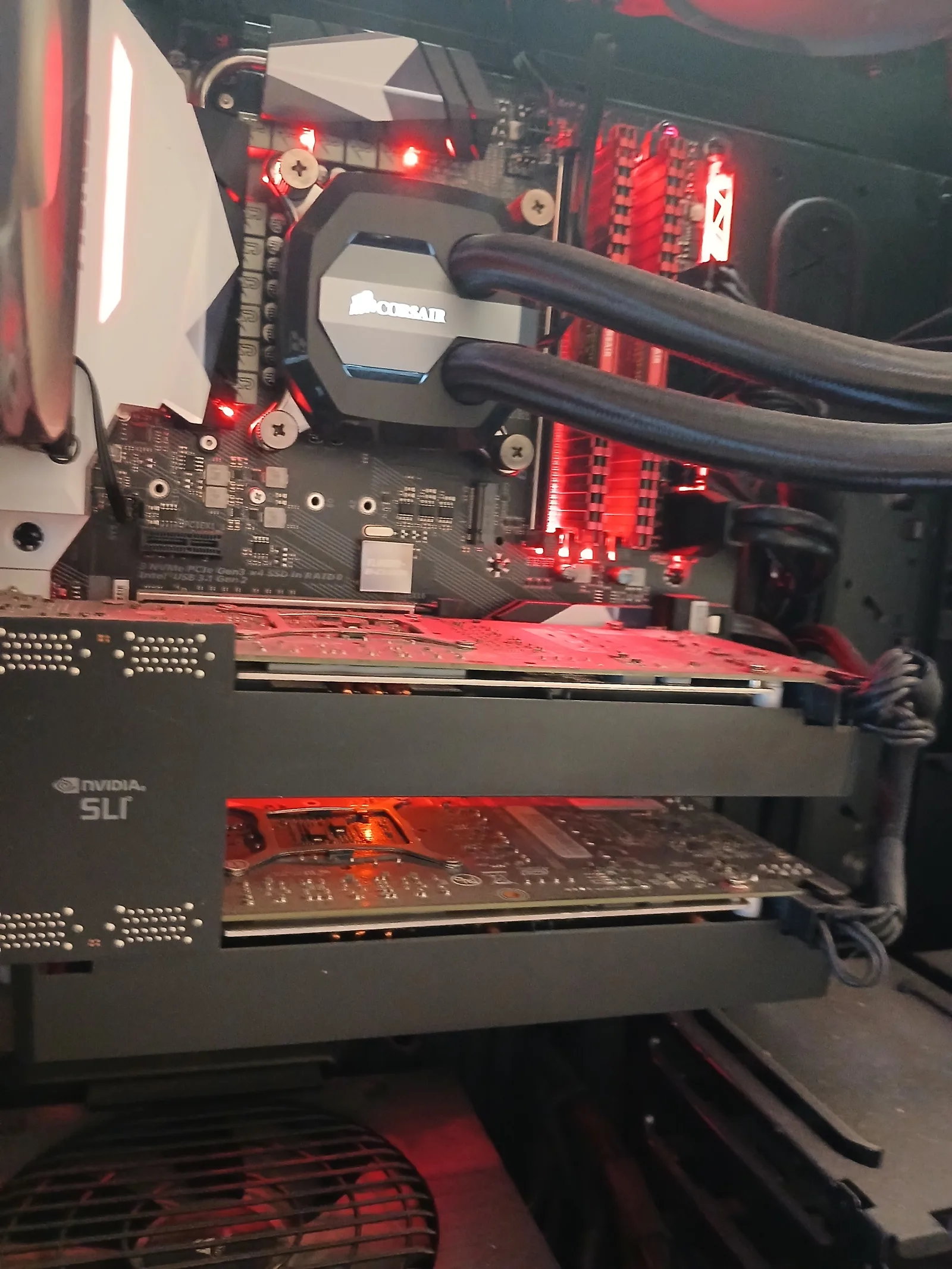
One came in this week that I haven't seen the likes of in a while. Dual NVIDIA graphics cards bridged together in SLI, sitting in a custom red-themed build with a Corsair AIO cooler on the CPU, Corsair Vengeance LED RAM, and that unmistakable "I built this when multi-GPU was still a thing" energy.
Multi-GPU rigs are quietly disappearing. Most enthusiast builds I see these days run a single big card — RTX 4080, 4090, or one of the new 5000-series — because that's where the industry has gone. NVIDIA officially killed SLI on consumer cards after the RTX 20-series, modern games rarely support multi-GPU rendering at all, and the people who built these rigs in 2016-2019 are mostly either still running them or have moved on to a single-card setup.
But every now and then one comes through the workshop, and they're worth talking about — both as a piece of recent computing history and because if you've got one, looking after it properly will keep it running for years yet.
What SLI Actually Was
SLI — Scalable Link Interface — was NVIDIA's technology for chaining two (or more) identical graphics cards together via a physical bridge connector, so they could share the rendering workload of a single game or application. AMD had its own equivalent called CrossFire. The promise was simple: roughly 60-80% more performance from a second card, at lower cost than buying the next tier up.
For a while it actually worked. The GTX 980 Ti SLI, 1080 SLI, and 1080 Ti SLI builds of 2015-2018 were absolute monsters — 4K gaming when 4K was still aspirational on a single card, and ridiculous frame rates at 1440p.
What Killed It
A few things at once:
- DirectX 12 shifted the responsibility. Under DX11, NVIDIA's drivers handled SLI scaling automatically. Under DX12 it became "explicit multi-adapter" — game developers had to implement it themselves. Almost none of them bothered.
- Driver maintenance was expensive. Every new game needed an SLI profile from NVIDIA. As the user base shrank, that work stopped being worth it.
- Single cards got powerful enough. The RTX 2080 Ti, then the 3090, then the 4090, were each strong enough to make a second card unnecessary for almost anything you'd actually do at home.
- NVLink replaced SLI for pros. NVIDIA quietly moved multi-GPU into the professional/datacentre space (NVLink on Quadro and A-series cards) and abandoned it on consumer hardware. The RTX 3090 was the last consumer card to keep multi-GPU. Everything since — RTX 40 series, RTX 50 series — has no multi-GPU support at all.
The funny thing: high-end older cards like the GTX 1080 Ti and RTX 2080 Ti have actually held their used-market value remarkably well. Partly because they're still excellent at 1440p, partly because of GPU rendering (Blender, V-Ray) and AI workloads (Stable Diffusion, local LLMs) that scale with raw VRAM and CUDA cores rather than newer features.
What An SLI Rig Is Still Good For
Just because new games don't benefit doesn't mean the hardware is obsolete:
- GPU rendering. Blender Cycles, V-Ray, Octane, and Redshift all use every GPU you give them. A pair of GTX 1080 Ti or RTX 2080 Ti cards will chew through renders that take ages on a single card.
- AI and machine learning at home. Stable Diffusion batch generation, fine-tuning, local LLM inference with large VRAM needs — all happily distribute across two cards. Two 11 GB 1080 Ti's give you 22 GB of usable VRAM for the price of a kebab compared to a new RTX 4090.
- Older games that still scale. The Witcher 3, Battlefield 4/1, Crysis trilogy, GTA V, Far Cry 5, and a handful of others still have working SLI profiles and benefit from the second card.
- CAD and engineering software. SolidWorks, AutoCAD, Revit, and similar apps can use multiple GPUs for viewport rendering and certain compute operations.
- Pure character. A clean SLI build is just cool. It's the muscle car of PC builds — slightly impractical, definitely not the optimal choice, but it has presence that a single-card rig doesn't.
What These Rigs Need From A Service
Older multi-GPU builds tend to need a specific set of attention:
- Thermal paste refresh on both GPUs. 5-8 year-old thermal compound is long past its best. New paste drops temps by 5-15°C on each card and the fans run quieter.
- AIO cooler service. Corsair, NZXT, and Cooler Master AIOs from this era are usually still going but the pumps slow down with time. Worth checking pump speed, topping up or replacing if needed.
- Full dust-out. Two cards mean double the heat output and double the dust collection. The space between the two GPUs is particularly bad for trapped fluff.
- PSU sanity check. A pair of 250W GPUs plus CPU plus everything else wants a serious PSU. If the original power supply was anything less than 850W gold from a reputable brand, it might be worth replacing before it gives up.
- BIOS and driver updates. Sometimes Windows updates break older SLI profiles. A careful driver rollback or a clean reinstall fixes most stability issues.
If You've Got One, Look After It
SLI builds are getting harder to maintain. Matching second cards are increasingly rare on the used market. SLI bridges (especially the high-bandwidth HB bridges) are scarcer still. Motherboards with SLI certification — meaning two or more PCIe x8 slots that actually work in dual-GPU mode — stopped being a common feature on new boards years ago.
The flip side: if you've got one in good working order, it's a small piece of computing history with real performance for the right workloads. Keep it serviced, keep it dust-free, and don't bin it just because a YouTuber tells you SLI is dead.
And if you've got something unusual — SLI, custom watercooling, an enthusiast build of any kind — that needs work, get in touch. I enjoy these jobs.
Frequently Asked Questions
Got A Custom Build That Needs Service?
Custom gaming PCs, enthusiast builds, watercooled rigs, multi-GPU setups, retro flex builds — I service all of them at Chiltern Computers in Harold Hill. Honest advice on what's worth doing, transparent fixed pricing, collection and delivery across Havering and most of Essex. No fix, no fee.
Computer repair specialist and founder of Chiltern Computers in Harold Hill. Soft spot for enthusiast builds, custom loops, and anything unusual that comes through the workshop. Honest advice, transparent pricing, and I'll always tell you when a repair or upgrade isn't worth doing.
Custom PC Build Or Service
Whether it's an SLI rig that needs a refresh, a watercooled build that needs servicing, or a brand new custom PC built from the ground up, I'm comfortable with all of it. Get in touch with what you've got — or what you'd like — and I'll quote it.
Get In Touch